Time Entries Guidelines
Timesheet - Tracking Project-wise Time
Introduction
Time entries will help the company identify the amount of time each employee spends on different projects/customers or frontend/backend/meetings etc.
Time entries have to be done daily without fail by all the employees. All the time entries have to be regularly monitored. This will be monitored by HR as well every month. Missing time entries will result in leave or loss of pay in case no leaves are available. So make sure it is up-to-date.
Where to track time?
The company is using the Timesheet application to track the tasks. Employees will be provided with an invitation to the workspace where all the company tasks are being tracked. Employees should track all of their time spent in this workspace only. Please refer this link to understand more about Timesheet
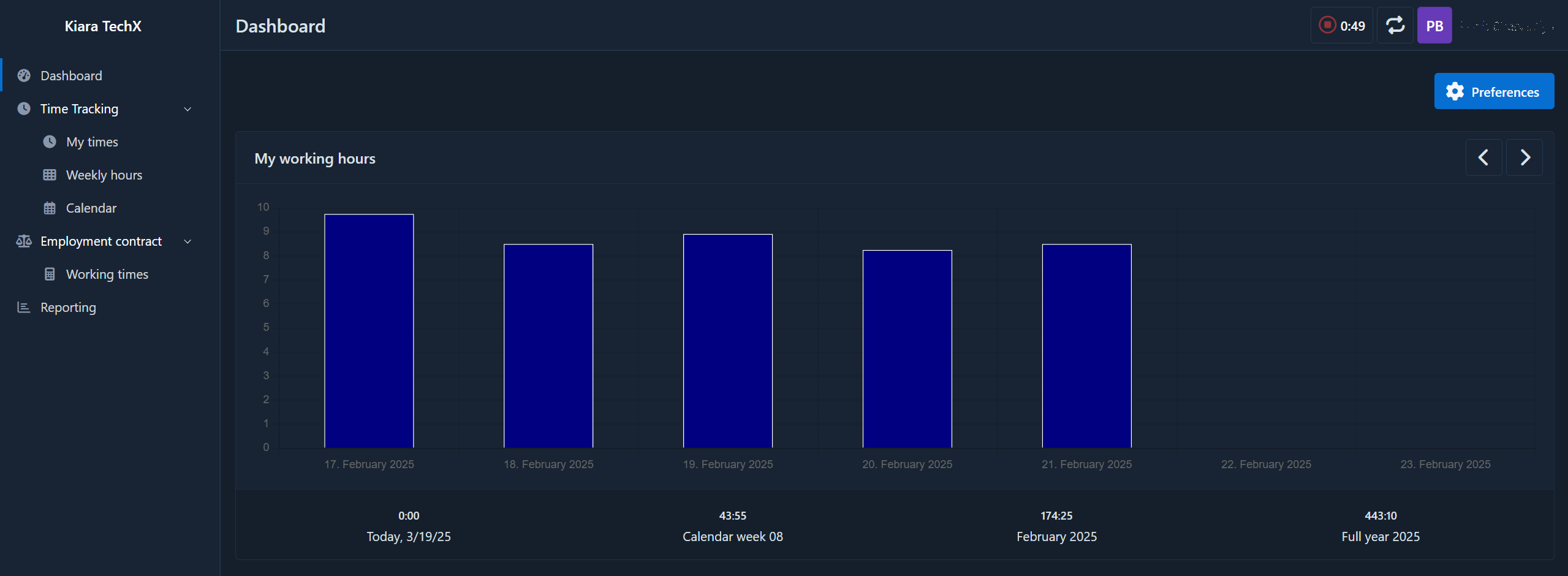 (This is a screenshot of the Dashboard)
How to track time?
After you get access to the Timesheet make sure to have access to a proper project. You can contact your project manager for access to the project you are working on. Please coordinate with the manager for the task details and time entries against which tasks you need to perform. The hierarchy in the Timesheet is something like this:
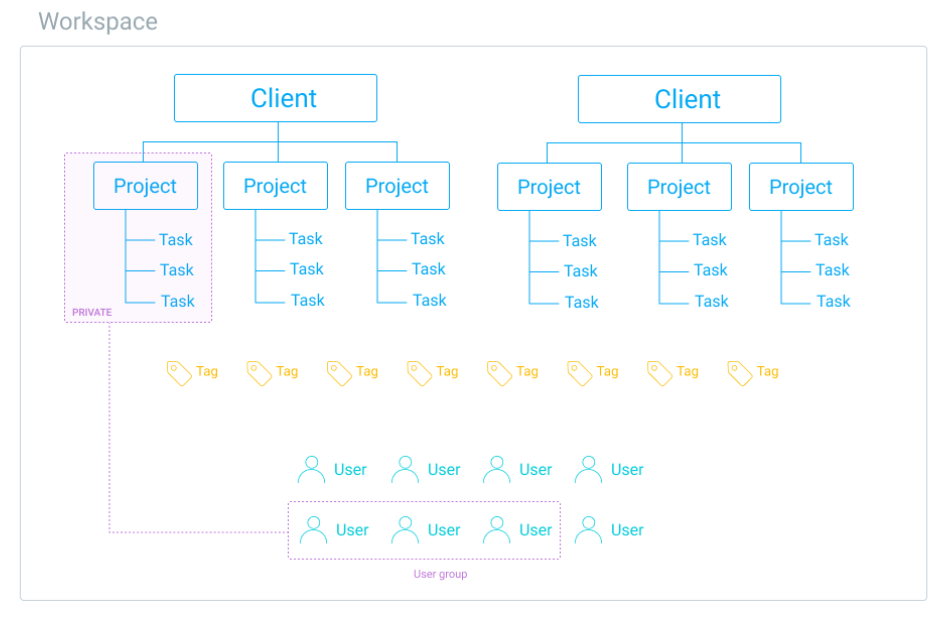
Example 1
For example, you have access to the project “XYZ” with the customer “C1”. That customer requires a website with a backend. So the tasks can look something like this:
- UX Designing
- Website Designing
- Content Management
- Authentication - Backend
- APIs - Backend
- Security Management - Backend
- Release - Backend
- Meetings
Based on the task name and assignee you can track your time in a particular task with the specific tag applied (explained in the "Adding Description & Tag in each Time Entries" section)
Example 2
You have access to the project “ABC” with the customer “C2”. That customer requires a website with an Admin Panel and Backend APIs. So the tasks can look something like this:
- UX Designing
- Website Development
- Admin Panel Development
- Backend APIs
- Meetings
- Release Management
Based on the task name and assignee you can track your time in a particular task with the specific tag applied (explained in the "Adding Description & Tag in each Time Entries" section)
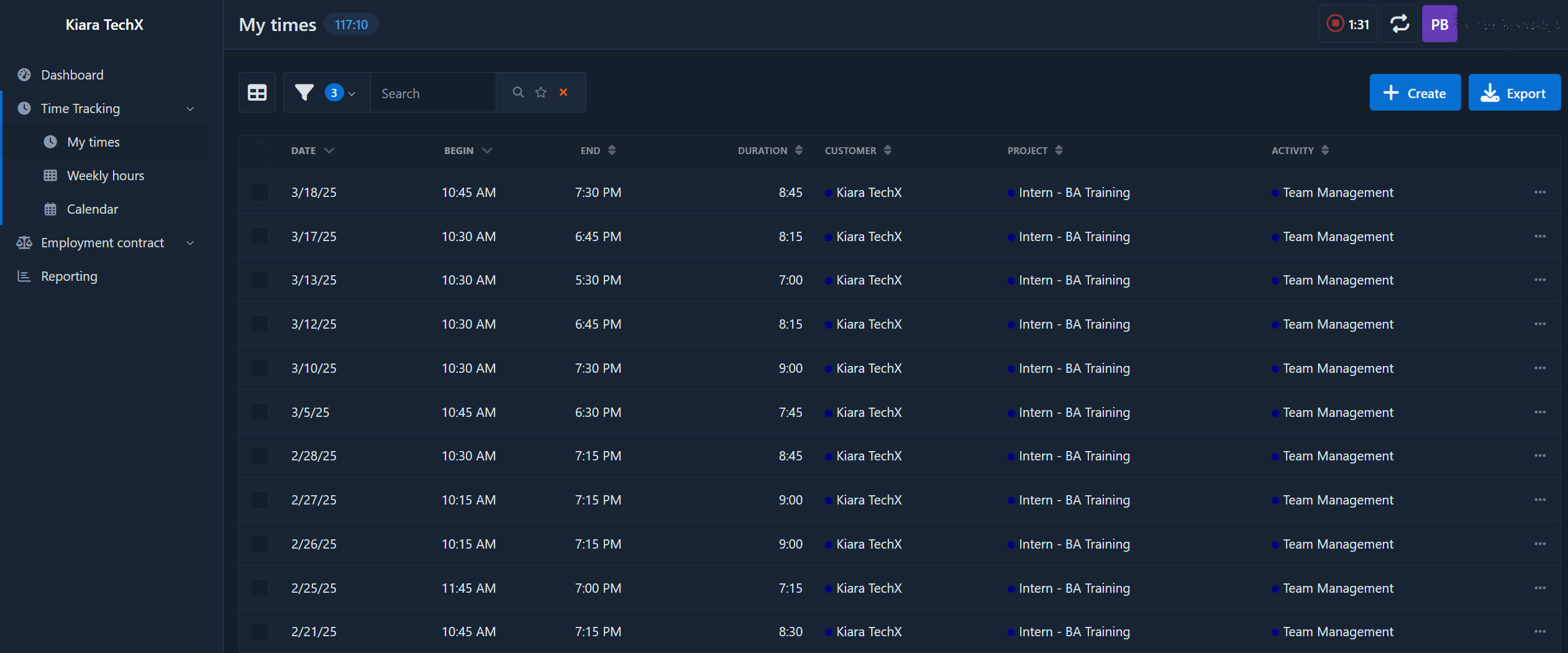
My Times
All your times entries will be reflected here in the listing. You can sort and filter them as per your need.
The time entry form
-
Step 1: Navigate to the Time Tracking -> My Times section.
-
Step 2: Click on the [+ Create] or [ ▶ 0:00 ] button to start the time tracking.
Note: No need to mention Duration/End in the form and it will track the time live and show the hour and minutes on the top, which is the recommended method.
[ H:MM ]
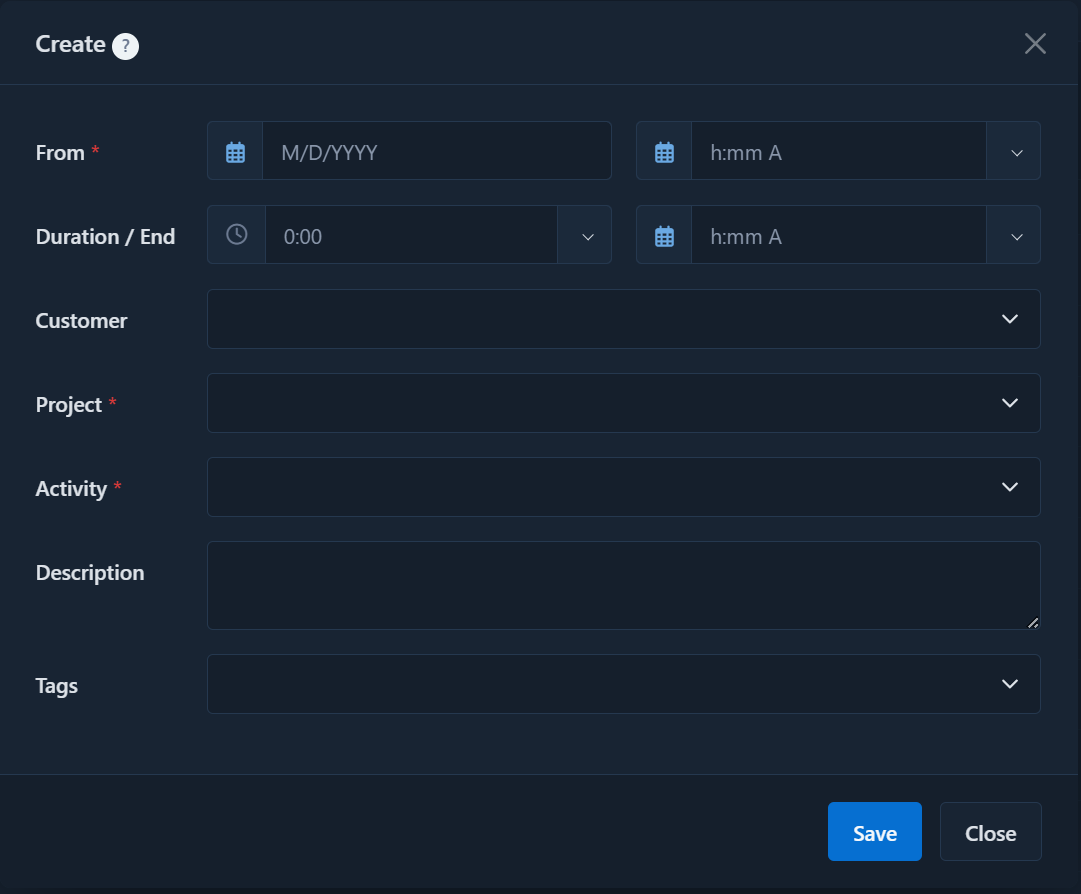
Adding Description & Tag in each Time Entries
When you are performing any time entries you need to add a small description for each time entry and a tag as well explaining the category of the work. The description should be clear about what you have done during that time, and what have you performed during that time period.
Regarding the tags, there are some company-level tags (with the prefix KTX) that need to be added to each entry. Exactly 1 tag should be assigned from these tags to each time entry. More tags can be used to categorize other things for that particular project (e.g., CR1, CR2, etc.). But, 1 tag from the company level tags, which can be identified with the name beginning from “KTX”, should be assigned.
Please find the tag list below with all the details required to understand each tag with their in-depth description.
| Tag | Description |
| KTX - UX | For any UX-related work that specifies designing the website layout or prototyping for the customer or internal teams. |
| KTX - Requirement Understanding | For any time spent understanding the requirements of the customer or any information provided by the management or internal team for the new tasks or bugs. |
| KTX - R&D | For any research work required to identify doable things or explore the new possibilities either asked by the customer or improving internal technical capabilities. |
| KTX - Internal Team Meetings | For any time spent on the internal team meetings held within the organization. This also includes the calls or discussions within the team or with the members of the organization. |
| KTX - Enquiry | For any time spent on any customer enquiry and providing them the time estimation or possible use cases for the development. This should be the category for any time spent before the project is confirmed with the customer (including meetings with the customer). |
| KTX - DevOps | For any server setup or git-based setup required for setting the environments required for development or production. |
| KTX - Client Meetings | For any time spent on customer communication (including meetings or chats). |
| KTX - Backend | For any time spent on the backend development. This includes working on any backend frameworks and/or API development that works behind the scenes and does not have anything that the customer communicates directly. |
| KTX - Frontend | For any time spent on the frontend development. This includes the website design with HTML/CSS and API integration on the front end that is customer-facing. |
| KTX - Documentation | For any work related to documentation should be put under this tag. |
Internal projects
For Internal projects select Kiara TechX as the customer.
Important Points
- Time should be entered excluding breaks. Break time should not be entered in the Timesheet.
- The main purpose of making time entries is to identify the areas where all of us are spending time. It will help the organization to streamline our processes, early identification to overspending time on a limited budget project, identify the areas of improvement, etc. So please make sure to make the correct time entries and do not enter any wrong time with wrong information in different projects to provide wrong information to the management. This practice will not be tolerated by the management in any case and strict action will be taken against them.
- You can communicate with your manager anytime for time entries in case of doubts.
Bookmarks
Please find some useful links here to learn more about Timesheet.
- Timesheet Login: https://timesheet.kiara.tech/en/login
- Timesheet View: https://timesheet.kiara.tech/en/timesheet/
- Weekly Hours: https://timesheet.kiara.tech/en/quick_entry/
- Calendar View: https://timesheet.kiara.tech/en/calendar/
- Employment Contract: https://timesheet.kiara.tech/en/contract